# Entitlement-based certification

Entitlement-based certification (also called micro-certification) focuses on a specific set of entitlements within one or more applications, rather than reviewing all access for a set of users.

Before starting, ensure data from the applications that need to be part of the review has already been imported into OpenIAM.

***

## Creating a new certification

{% stepper %}
{% step %}

#### Log in and create a new access certification

Log in to the webconsole and go to **Access Control → Access Certification**.

Click **New Access Certification** from the side menu.

<figure><img src="/files/ftYmjpjReT563a7OA74R" alt=""><figcaption></figcaption></figure>
{% endstep %}

{% step %}

#### Complete the form

Complete the form using the table below.

| Field                      | Required | Description                                                                                                                                                                                      |
| -------------------------- | -------- | ------------------------------------------------------------------------------------------------------------------------------------------------------------------------------------------------ |
| Access Certification name  | Yes      | A descriptive name to uniquely identify this campaign.                                                                                                                                           |
| Type of certification      | Yes      | Select **Application** for an entitlement-focused review.                                                                                                                                        |
| Description                | No       | Summary describing the goals of this campaign.                                                                                                                                                   |
| Status                     | Yes      | Active or inactive. This only affects the **automatic schedule** — it does not affect the ability to launch manually.                                                                            |
| Scheduled interval         | No       | Automatically run the campaign at regular intervals: annually, semi-annually, or quarterly.                                                                                                      |
| Reference start date       | No       | Used to calculate the schedule for automatic runs. This is **not** related to manual execution.                                                                                                  |
| Email template             | No       | Email template to use for reviewer notifications.                                                                                                                                                |
| Manager of access review   | No       | The person overseeing campaign execution. They have access to the dashboard and reports, and can delegate requests. This person is different from reviewers who participate in the review steps. |
| Membership tags to exclude | No       | Filter out specific types of access assignments from the review. See [Membership tags](/access-review/membership-tags.md).                                                                       |

Click **Save**. The campaign configuration is saved and additional tabs become available.

<figure><img src="/files/uCGgCl8hO40IQKwoBi2M" alt=""><figcaption></figcaption></figure>
{% endstep %}
{% endstepper %}

***

## Defining applications for the review

{% stepper %}
{% step %}

#### Open the campaign and select applications

Click **Access Certification search**, find your campaign, and click the **Edit** icon.

Go to the **Application** tab and select the applications to include.
{% endstep %}

{% step %}

#### Choose how entitlements are included

For each application, choose how entitlements are included:

<table><thead><tr><th width="203.66668701171875">Option</th><th>Description</th></tr></thead><tbody><tr><td>Use all entitlements</td><td>All entitlements from the application are included in the review.</td></tr><tr><td>Select entitlements</td><td>Choose specific entitlements to review. Useful when only a small number need review.</td></tr><tr><td>Exclude entitlements</td><td>Include all entitlements except those explicitly excluded.</td></tr></tbody></table>

<figure><img src="/files/ZLdJHMyMGFcFSRnfg2Pa" alt=""><figcaption></figcaption></figure>
{% endstep %}

{% step %}

#### Select the entitlements

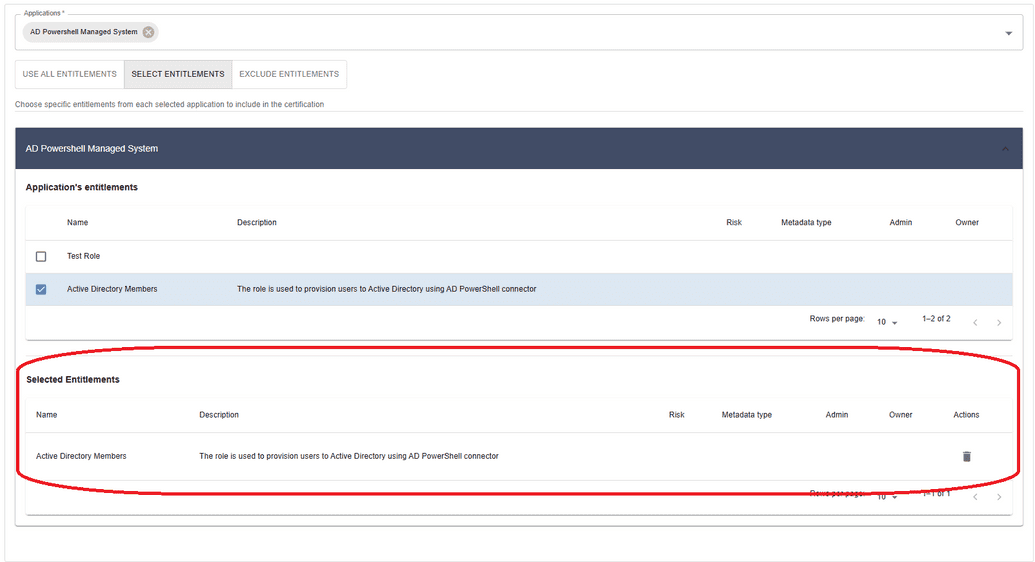
Click on the application name to open the entitlement selection view. Check the box next to each entitlement to include or exclude. Selected entitlements move to a separate table to confirm selection.

<figure><img src="/files/Q12DyaAkss4v5m2CLlzo" alt=""><figcaption></figcaption></figure>

As you select the entitlements needed for your review, check the box next to each entitlement to select or exclude it. These entitlements will be moved to another table, shown below, to indicate that they have been selected for the review.

<figure><img src="https://docs.openiam.com/docs-2026.5.1/static/25eb391fb6d1817131198e9e0f4ae27a/e3189/UAR-newcert-application-tab-table.png" alt=""><figcaption></figcaption></figure>
{% endstep %}
{% endstepper %}


---

# Agent Instructions: Querying This Documentation

If you need additional information that is not directly available in this page, you can query the documentation dynamically by asking a question.

Perform an HTTP GET request on the current page URL with the `ask` query parameter:

```
GET https://docs-beta.openiam.com/access-review/entitlement-based-certification.md?ask=<question>
```

The question should be specific, self-contained, and written in natural language.
The response will contain a direct answer to the question and relevant excerpts and sources from the documentation.

Use this mechanism when the answer is not explicitly present in the current page, you need clarification or additional context, or you want to retrieve related documentation sections.